Why Built-In Tools Matter
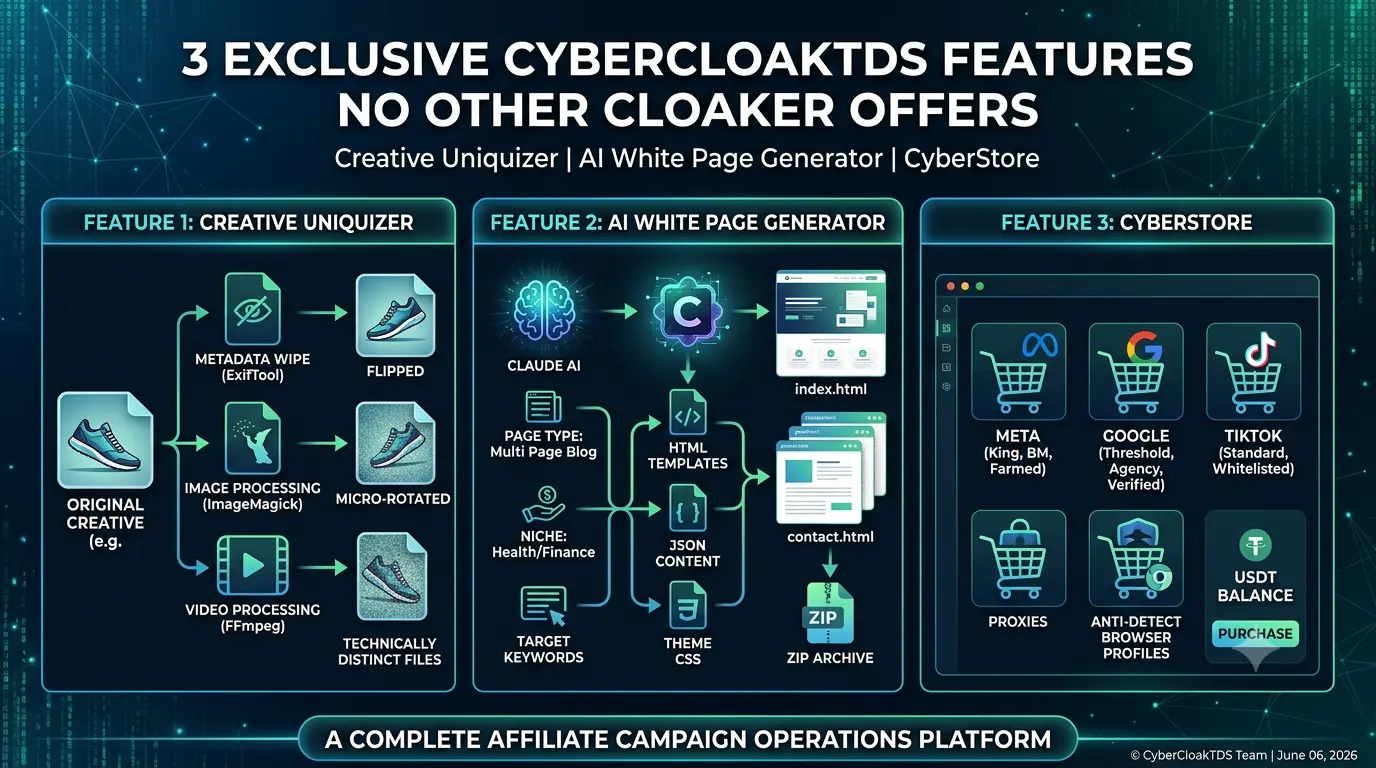
Most cloaking systems stop at traffic routing. CyberCloakTDS goes further — every workflow that affiliate marketers do repeatedly outside their cloaker (uniquizing creatives, generating white pages, sourcing ad accounts) is available directly inside the dashboard. No tab-switching, no third-party subscriptions, no extra login. Here is a detailed look at three features that set CyberCloakTDS apart.
Feature 1 — Creative Uniquizer
Ad networks detect duplicate creatives at the pixel and file level. Upload the same image or video twice — even from a different account — and their system flags it. The Creative Uniquizer solves this by generating a technically distinct file that looks identical to the human eye but has a completely different fingerprint.
What It Does to Your File
Every processed creative goes through a two-stage pipeline:
Stage 1 — Metadata Wipe and Fake Device Injection (ExifTool)
Before any visual processing, the original file metadata is completely stripped. Then a fresh set of fake metadata is written in:
- Device make and model — randomly chosen from a pool of real devices (Apple iPhone 14 Pro, Samsung Galaxy S23, Google Pixel 7, OnePlus 11, Xiaomi 13 Pro, etc.)
- Software version — matching iOS or Android version for the chosen device
- GPS coordinates — random offset around one of 10 major cities (New York, London, Paris, Tokyo, Delhi, Mumbai, Sydney, Moscow, San Francisco, Rome)
- Date and time — random timestamp within the last 30 days
- Artist and Copyright fields — wiped blank
This alone makes the file unrecognizable to any metadata-based duplicate detection system.
Stage 2A — Image Processing (ImageMagick)
For JPEG, PNG, and WEBP files, ImageMagick applies the selected visual transforms:
| Setting | Options | What It Changes |
|---|---|---|
| Flip | Horizontal, Vertical | Mirror the entire image — use only when no text is present |
| Noise Type | Uniform, Gaussian, Multiplicative, Pulse, Laplace, Poisson | Adds sub-pixel noise — changes every pixel value slightly |
| Noise Intensity | Low (0.03–0.06), Medium (0.07–0.13), High (0.15–0.25) | Controls how much the noise affects visible pixels |
| Blur | Normal (0.5–1.5px), Adaptive | Slight softening — only use when sharpness is not critical |
| Sharpness | Improve | Sharpening pass — changes edge pixel values |
| Pixel Shift | Low (1px), Medium (2px), High (3px) | Spreads random pixels — alters spatial hash |
| Rotation | Micro (0.1–0.2 degrees only) | Sub-degree rotation — invisible but changes all pixel coordinates |
| Quality | 70–79%, 80–89%, 90–99% | JPEG re-encoding at new quality — changes compression artifacts |
| Grayscale | Normal, 3D Effect | Converts to grayscale or applies 3D shade effect |
| Frame | Add thin border | Adds 2px white border — changes image dimensions |
| Watermark | Upload PNG overlay | Composites a transparent PNG at 30% opacity over center |
Stage 2B — Video Processing (FFmpeg)
For MP4, MOV, WebM, and AVI files, FFmpeg handles the transformation:
- Brightness and contrast micro-adjust — imperceptible change of ±0.008 brightness and ±0.005 contrast applied to every frame
- Re-encode with CRF 18–22 — full H.264 re-encode at a random quality level, producing a completely new bitstream
- Audio noise injection — a tiny random noise signal (amplitude 0.0001) is added to the audio channel, changing the audio fingerprint
- Video grain (manual mode) — FFmpeg noise filter at intensity 5 / 12 / 22 for low / medium / high grain
- Flip and micro-rotation — same as images, max 0.2 degrees to keep text readable
- Metadata clear — title, author, comment, description all wiped from container metadata
Random Mode vs Manual Mode
Random Mode is the recommended default for most campaigns. It applies only changes that are completely invisible to the human eye but still produce a unique file hash:
- Quality jitter between 91–96% — looks identical, different JPEG encoding
- 30% chance of Gaussian noise at Low intensity (0.03–0.06 attenuation) — sub-pixel change
- 40% chance of micro rotation (0.1° or 0.2°) — imperceptible but moves every pixel
- No flip, no blur, no grayscale, no pixel shift — these are visible and would affect ad creative quality
Manual Mode gives you full control over every parameter. Use it when you want to apply visible transforms like flip (for creatives without text), watermark overlay, or specific noise types.
Supported Formats
- Images: JPEG, PNG, WEBP — max 10MB
- Videos: MP4, MOV, WebM, AVI — max 20MB
Processing typically takes 2–5 seconds for images and 10–30 seconds for videos depending on file size. The output file is available for download immediately after processing and is automatically cleaned from the server after 1 hour.
Feature 2 — AI White Page Generator
A white page is the safe website that moderators and bots see instead of your offer. It needs to look like a real, legitimate website — real content, real structure, real metadata. Building one by hand takes hours. The White Page Generator builds a complete, ready-to-upload website in under 60 seconds using Claude AI.
How the Generation Pipeline Works
Step 1 — You Define the Context
Fill in the generation form:
- Page Type — Multi Page Blog, App Landing Page, or Single Article
- Niche / Vertical — e.g. health supplements, finance, fitness, travel
- Language — English, Hindi, German, French, Spanish, and more
- Theme — 5 visual themes (Clean Medical, Dark Tech, Nature Green, Finance Professional, Minimal White)
- Domain, Company Name, Phone, Email — used to populate contact page and footer
- Target Keywords — guide the AI to write SEO-matching content for your niche
Step 2 — Claude AI Fills the Content
The system builds a JSON skeleton with every content placeholder the HTML templates need — article titles, excerpts, a full ~600-word article body, author name, date, category, privacy policy text, terms and conditions, contact info, and more. This skeleton is sent to Claude (claude-sonnet-4-6) with a detailed prompt specifying the niche, language, and compliance rules.
Claude returns a filled JSON object. The system validates the JSON and extracts every field. For a Multi Page Blog this includes over 35 distinct content pieces — 6 article summaries, 1 full post, 3 related articles, author bio, privacy policy, terms, cookie notice, and GA tracking ID placeholder.
Step 3 — HTML Templates Are Populated
Pre-built HTML templates are loaded from the whitepage_templates folder. Every {{PLACEHOLDER}} in the template is replaced with the AI-generated content using PHP str_replace. Leftover unfilled placeholders are then cleaned up with a regex pass so no raw placeholder text ever appears in the final HTML.
The selected theme CSS file (theme1.css through theme5.css) is already referenced in the templates so no extra styling work is needed.
Step 4 — Download as ZIP
All generated files are bundled into a ZIP archive stored in uploads/whitepages/ and the generation is saved in your history. Download the ZIP, extract it, and upload the contents to your campaign domain.
What Each Page Type Produces
| Page Type | Files Generated | Best For |
|---|---|---|
| Multi Page Blog | index.html (blog listing), post.html (full article), article.html (alt layout), privacy-policy.html, contact.html — with full AI content | Facebook, TikTok — moderators expect a real content website |
| App Landing Page | app-landing.html with hero section, features, testimonials, screenshots placeholders, download CTA | Google UAC, TikTok App campaigns — looks like a real app product page |
| Single Article | article.html with one full long-form article, author section, related posts | Native ad networks — article-style white pages blend with content feeds |
All images in generated white pages are loaded from Picsum Photos (random, high-quality stock images). No broken images, no placeholder squares — looks real on first load without any additional setup.
Feature 3 — CyberStore
CyberStore is a built-in marketplace for the tools and accounts affiliate marketers need to run paid campaigns. Instead of searching through Telegram channels or grey-market forums, everything is available directly inside your CyberCloakTDS dashboard, purchasable with your USDT balance.
What Is Available
| Category | Available Types | Use Case |
|---|---|---|
| Meta Accounts | King, Autoreg, Farmed, BM (Business Manager), Fan Page, King+BM, King+BM+RK combos | Facebook and Instagram ad campaigns — fresh accounts or aged accounts with spend history |
| Google Accounts | Standard, Threshold, Agency, Verified | Google Ads search and display campaigns — accounts with existing billing thresholds skip prepay requirements |
| TikTok Accounts | Standard, Business, Agency, Whitelisted | TikTok Ads performance campaigns — agency and whitelisted accounts have higher policy tolerance |
| Proxy and Tools | Residential, Mobile, Datacenter, IPv6 proxies — plus anti-detect browser profiles | Account warming, multi-account management without cross-contamination, bypassing IP reputation bans |
Account Types Explained
- King — Highest quality Facebook accounts with long account history, trusted payment methods, and spend history. Best for scaling without bans.
- Autoreg — Freshly registered accounts. Cheaper but require warming. Good for testing creatives before moving to better accounts.
- Farmed — Accounts that have been aged and warmed with organic activity before being used for ads. More stable than Autoreg.
- BM (Business Manager) — Facebook Business Manager accounts for running ads through an organization structure. Required for some verticals and spending levels.
- Threshold accounts (Google) — Google Ads accounts with an existing billing threshold, meaning you spend first and pay later. Delays payment processing and allows higher daily budgets immediately.
- Whitelisted (TikTok) — TikTok accounts that have been approved for restricted categories or have a history of approved ad spend. Fewer rejections on policy-sensitive creatives.
How to Purchase
- Add USDT balance to your CyberCloakTDS account via the Finance section.
- Browse CyberStore — select the network (Meta, Google, TikTok, or Proxy) and then the specific product.
- Purchase directly using your balance. No external checkout, no separate platform login.
- For questions or custom orders, use the built-in support ticket system — responses within 1–2 hours.
The Full Stack in One Place
Used together, these three features cover the complete affiliate campaign setup loop without leaving CyberCloakTDS:
- Buy the ad account you need from CyberStore
- Generate a white page that passes manual review using the AI generator
- Uniquize your creative so every upload has a fresh fingerprint
- Create your flow, download index.php, and launch
No other self-hosted cloaking system packages all of this into a single dashboard. This is what makes CyberCloakTDS more than a traffic router — it is a complete affiliate campaign operations platform.